

OpenViking tools in the gateway
With OpenViking tools on, the model searches, reads and writes OpenViking memory by itself while it answers, and the gateway runs those tool calls for the client. The feature is meant for chat apps and API apps that cannot connect to the OpenViking MCP server; clients that support MCP or have a plugin, such as Claude Code and Codex, are better served by those, because they show each tool call and its result and ask for approval first. In Studio: Profiles → OpenViking tools, together with Allow OpenViking tools on each upstream.
Agentic memory for any client
With automatic recall, the gateway guesses what the model needs. With OpenViking tools on, the model decides for itself what to search, read and remember. The gateway runs the tools, so this works even when the client's request has no tools at all.
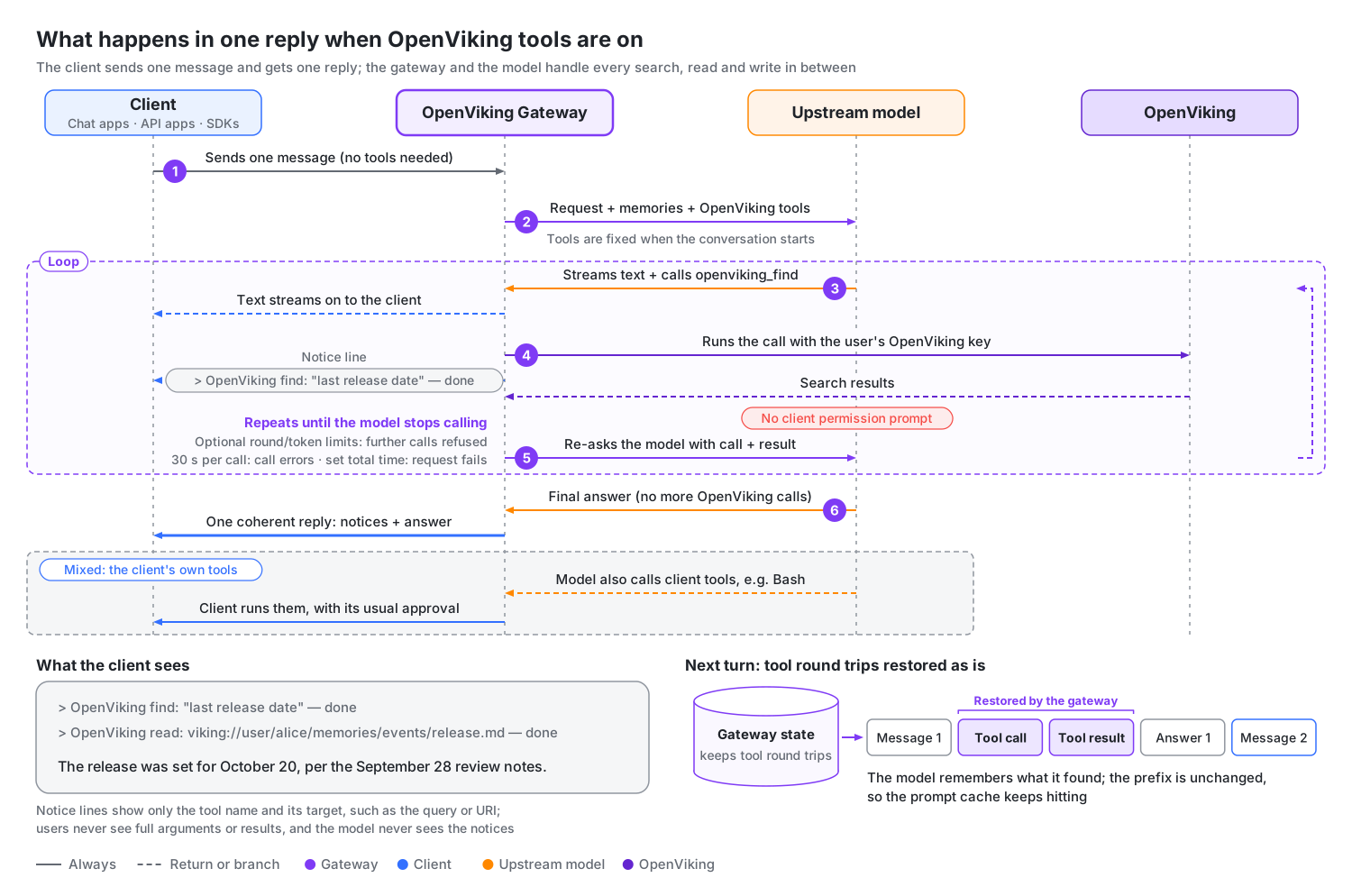
- Several steps in one reply: the gateway intercepts the model's OpenViking tool calls, runs them with the user's OpenViking key, feeds the results back and asks the model again, until the model stops calling them. The client receives one continuous reply, streaming or not.
- The client's own tools still work: in the same reply, the model can call both OpenViking tools and client tools such as Bash. Client tool calls go to the client unchanged and pass through its permission prompts as usual.
- The next turn remembers: tool calls and results are not in the client's history, so the gateway stores these rounds and replays them unchanged on the next turn. The model remembers what it found, and the prompt cache keeps working.
What each kind of client gets
| Client | Without the gateway | Through the gateway, with OpenViking tools on |
|---|---|---|
| Chat apps, such as Cherry Studio and Open WebUI | To use memory you set up MCP or write tools yourself; a plain chat only exchanges text. | The model searches memory and reads the original text by URI. With remember checked, it notes down what the user asks it to remember; with add_resource checked, it imports files the user attaches. This works even in a plain chat mode with no tools. |
| SDK scripts and low-code platforms | One question, one answer; multi-step work needs a loop you write. | One request covers "search → read → grep for exact matches → answer", with no code changes. |
| Coding agents such as Claude Code and Codex (without the OpenViking plugin or MCP server) | Their own tools, but no OpenViking. | OpenViking tools and client tools such as Bash mix in the same reply. If you want to approve each tool call, the plugin or MCP server is still the better choice. |
Which tools the model can use
The tool list comes straight from the MCP tools your OpenViking server provides, each with an openviking_ prefix, so tools that OpenViking adds later become available on their own. The model works within the user's own OpenViking permissions. The common groups:
| Purpose | Tools | What the model uses them for |
|---|---|---|
| Search | find, search, grep, glob | Semantic search over memory and resources; exact lookups by regular expression or file name. |
| Browse and read | list, tree, read | Expanding a recalled entry to its original text by URI; browsing memory and skill directories. |
| Write | remember, write, edit | Storing a long-term memory; writing or editing memory files. |
| Import | add_resource, add_skill | Importing a web page or repository by URL, importing a chat attachment, creating a skill from text, all without a shell on the client. |
| Delete and permissions | forget, set_acl and others | Deleting memory permanently; changing access to shared resources. |
Which of these a new profile selects is under Choose tools. An experimental profile setting, Agent-managed context windows, gives the model two more tools for starting a fresh context window; see Experimental: agent-managed context windows.
What users see
The model's text streams as usual. With Show tool calls on (the default, in the context profile's OpenViking tools section), each OpenViking tool call leaves a one-line notice at the point in the reply where the call happened:
> OpenViking find: "the release date we agreed on" — done
> OpenViking read: viking://user/alice/memories/release.md — done- What a notice names: the tool and, when the gateway can tell, what the call works on: the search query, the URI read, listed or written, or the file or skill being imported. Users never see the full arguments or the results.
- When it appears: in a streaming reply, the notice appears as soon as the call starts, so users can see the gateway working during slow calls such as imports. A non-streaming reply carries the same notices in the final message.
- Where it goes: each notice is its own paragraph. In Chat Completions the notices are part of the reply text; in Anthropic Messages the notices for one round of calls share a text block; in Responses they share an assistant message.
- Only for users: the model never sees the notices; it gets the real calls and results. The gateway does not save notices to OpenViking.
- Token usage: the usage the client receives is the sum of every model call in the reply, including the extra calls made while the model used tools.
Tool call notices
When a call ends, the gateway adds its outcome to the notice:
| Outcome | Meaning |
|---|---|
done | The call finished. |
failed | The call returned an error. |
skipped | The gateway refused the call without running it, for example because the round limit or token budget was used up. |
To hide the notices, turn off Show tool calls. Like other profile changes, this reaches only new conversations (see When changes take effect).
Risks and controls
Warning: Selected tools run without the client's permission prompts, including tools that write or delete data; a tool-call notice reports a call after it ran and is not an approval step. If users need to approve each call, connect the OpenViking plugin or MCP server instead (see Gateway or plugin?). The model can never do more than the user's own OpenViking permissions allow.
Before you check a tool that changes data, make sure that is acceptable. For profiles used by chat apps, leave at least forget and set_acl unchecked.
What admins control:
| Control | Where in Studio | What it does |
|---|---|---|
| OpenViking tools switch | Profiles → OpenViking tools | Turns gateway tools on or off for conversations that use the profile. |
| Tools checkboxes | Profiles → OpenViking tools | Picks which tools the model gets; see Choose tools. |
| Allow OpenViking tools | Upstreams → Routing | Lets profiles offer tools through this upstream. Turning it off also stops them in ongoing conversations. |
| Rounds, total time and token budget | Profiles → OpenViking tools → Advanced settings | Caps how long the model can keep using tools; see Limits. |
Choose tools
The Tools list in a context profile's OpenViking tools section decides which OpenViking tools the model gets. New context profiles have OpenViking tools on, including those made with Create with recommended settings, and every tool is selected except the ones the gateway knows change data:
| Default | Tools |
|---|---|
| Selected | find, search, grep, glob, list, tree, read, download, list_watches, get_acl, list_users, list_groups, health |
| Not selected (they change data) | remember, write, edit, add_resource, add_skill, forget, set_acl, cancel_watch |
Check remember to let the model save memories, and add_resource to let it import web pages or attachments. Read the warning in Risks and controls before checking any tool that changes data.
Allow OpenViking tools is on by default for every upstream. With both switches on, new conversations get the selected tools with an openviking_ prefix, such as openviking_find and openviking_read. Tool definitions go with every request in the conversation, and the full set adds about 3,500 input tokens, so unchecking tools nobody needs also saves tokens.
Things to know about the list:
- Where it comes from: the Tools list comes from your OpenViking service, and Studio describes what each tool does. When OpenViking annotates a tool, Studio also shows a Read only or Modifies data badge next to it. OpenViking marks
searchas Modifies data, but the gateway still selects it by default. - Tools added later: tools that OpenViking adds later are available by default; ongoing conversations keep the tool list they started with. Existing context profiles keep their selection.
- The list is empty for root: OpenViking does not accept root API keys for its tools, so for root the gateway reads the list with the OpenViking key behind a gateway key issued in the current account. Until the account has a gateway key, the list can be empty and Studio shows Issue a gateway key to load the tool list. Issue a key first, or edit the profile signed in as a user or account admin. A profile saved before then keeps the default selection.
downloadneeds a shell:downloadreturns a one-timecurlcommand, so the client needs a shell tool, and the link must be reachable from the client. See With a client shell tool for which names count and where the link points.
Client requirements
OpenViking tools work with all three model APIs, streaming and non-streaming, as long as the client sends the full conversation every turn:
| Protocol | What the client must do |
|---|---|
| Chat Completions | Send the full messages history. |
| Responses | Use store: false and the full input history, and on the next turn send back the whole returned output, including reasoning and client tool calls. item_reference cannot rebuild the full history. |
| Anthropic Messages | Send the full messages history with thinking and signature blocks intact. Token-count requests carry the same tool definitions but run no tools. |
When the model calls OpenViking tools and client tools in the same reply, the gateway handles the OpenViking calls, and the client runs its own tools and returns their results as usual. Responses supports client function and custom tools; Anthropic Messages supports client tool_use calls.
Responses requests that rely on state stored at the provider (previous_response_id, conversation, background), or that do not set store: false, are forwarded as they are: they get neither recalled memory nor OpenViking tools. Later lookups of those responses still go to the upstream that created them.
When tools are not offered
A request can reach the model without OpenViking tools even though its context profile has them on. Its detail in the Requests tab then shows Not offered: followed by the reason. Studio shows the label; the code in parentheses is the value in the management API (tool_skip_reason):
| Reason | Meaning |
|---|---|
Responses requests must send the full conversation and set store: false (tools_require_full_history) | A Responses request needs store: false and the full input history, without item_reference. |
OpenViking tools are turned off for this upstream (upstream_tools_disabled) | The upstream has Allow OpenViking tools off. |
The request asked for several choices (n > 1) (tools_multiple_choices) | The request asks for several choices (n above 1). |
The request asked for structured output (tools_structured_output) | The request asks for structured output (response_format, text.format or output_config.format). |
The client sent tools that are not functions (tools_non_function) | A Chat Completions client sent a tool that is not a function. |
The client required a specific tool (tools_forced_choice) | tool_choice is anything other than auto or none: for example required, Anthropic any or tool, a named function, or a Responses object such as allowed_tools. |
DeepSeek thinking is on and earlier reasoning cannot be sent back (deepseek_reasoning_history_required) | The upstream is DeepSeek, thinking is on (standard Responses requests have no thinking field and count as on), and earlier replies would reach DeepSeek without their reasoning. Turn on Restore reasoning the client drops in the upstream's Routing section (details and cases it cannot cover), or send "thinking": {"type": "disabled"}. |
The client already has OpenViking tools (tool_name_collision) | The gateway stops offering its own tools for the rest of the conversation (requests that resend history in which the model already called gateway tools keep them). See When the client has its own OpenViking tools. |
OpenViking's tool list couldn't be loaded when this conversation first needed it (tools_unavailable) | The tool list could not be loaded from OpenViking, and no earlier list was available. Start a new conversation once the connection is back. |
This conversation has no OpenViking tools (tools_not_selected_at_session_start) | The profile has tools on, but this conversation's tool list is empty: either the profile selects no tools, or the conversation started before a gateway upgrade. Start a new conversation. |
When the decision is made
Whether a conversation gets tools is decided at its first request that could use them (housekeeping requests such as title generation do not count) and then stays fixed, so profile changes only reach new conversations. The one exception switches tools off: the client turns out to have OpenViking tools of its own before the model has called a gateway tool, for example because an MCP server connected after the first turn.
Housekeeping requests, sub-agent requests and conversations where an OpenViking plugin was detected never get OpenViking tools. If such a request sends back history in which the model used these tools, the gateway still attaches the tool definitions so the history stays valid, but refuses new OpenViking calls. The client's own tools stay available in every request.
When the client has its own OpenViking tools
The gateway decides that the client already has OpenViking tools (tool_name_collision) when any of these holds:
- An MCP server name (
server_label,mcp_server_name,mcp_servers[].name) contains the wordopenviking. - A tool whose name ends in an OpenViking tool name also contains that word, such as
mcp__claude_ai_OpenViking__search. A connector'sauthenticatetool does not count. Deferred tools listed by name on a line of their own count too. - A prefixed tool whose name ends in an OpenViking tool name, such as
mcp__ov__read, mentionsviking://in its definition. - In any request, a client tool has the same name as a gateway tool, because upstreams reject duplicate tool names.
A false match also lasts for the whole conversation; start a new one.
Import files and skills
The model can import material when your OpenViking service provides the import tools (add_resource, add_skill) and the profile has them checked. Importing by URL needs nothing more. Importing a local file needs either a client shell tool or an attachment on the user message. Uploads are limited by max_body_bytes, the gateway's request size limit (32 MiB by default; see Side effects).
With a client shell tool
A shell tool is a client tool named like bash, shell, exec_command, terminal or run_command. The import tool returns a one-time upload link, and the model uploads the file with the client's shell tool, which goes through the client's permission prompt. Skill directories are zipped first.
Upload links, and the download links that download returns, point to public_url plus /gateway/uploads or /gateway/downloads. So public_url must be an address the client can reach (see Public address), and any proxy in front must forward those paths like the others. Without public_url, imports fail with "Set gateway.public_url for client uploads and downloads". With mcp_file_links set to direct, the gateway passes OpenViking's own links through unchanged. They then point at OpenViking Server, whose OPENVIKING_PUBLIC_BASE_URL (or server.public_base_url) must be an address the client can reach.
From an attachment
Without a shell tool, the model can import a file attached to a user message, sent either as base64 data or as attachment text. This covers embedded base64 and text data in Chat Completions file parts (file.file_data, as raw base64 or a data: URL), Responses input_file and Anthropic document.source. Open WebUI usually sends only the extracted text, which is imported as a text file.
Attachment URLs and provider file IDs are not fetched; to import a remote resource, use the import tool's URL parameter.
Limits
Rounds, total time and the token budget have no limit by default: as in an agent's own tool loop, the model keeps using OpenViking tools until it is done. In Studio, the limits are under Profiles → OpenViking tools → Advanced settings, and an empty field means no limit:
| Setting | Default | At the limit |
|---|---|---|
| Rounds per request | No limit | Further OpenViking calls are refused; the model continues with the results it has and the client's own tools. |
| Time limit per call | 30 s | The call returns an error to the model. |
| Result size | 65,536 bytes | The result is truncated. |
| Total time | No limit | The request fails with "Hidden tool request timed out"; see Failure handling. |
| Token budget | No limit | Further OpenViking calls are refused; the model continues with the results it has and the client's own tools. This is not a billing cap; the final answer can go past it. |
API names and allowed ranges are in Context profile settings.
Note: A non-streaming request keeps running after the client disconnects, so set Total time if your clients send non-streaming requests. In a streaming request, the user can stop the reply at any time, and the gateway stops when the client disconnects.
The token budget counts only what using OpenViking tools adds: the extra calls, their results and the model output that follows. The client's existing conversation, tool definitions and images do not count. The gateway keeps the client's limit on answer length (max_tokens, max_completion_tokens or max_output_tokens).
To see what one request used, expand it in the Requests tab: the OpenViking tools item shows the rounds, the extra model calls and the tokens added, plus Tool token budget reached when the budget refused further calls.
Profiles saved before these defaults became "no limit" keep their old values (5 rounds, 120 seconds, 100,000 tokens); clear the fields to remove the limits.
Failure handling
When a single OpenViking call fails, the model receives an error result and can carry on with its answer. The whole answer fails only in these cases:
- The provider rejects a follow-up model request.
- The model calls an OpenViking tool that is not available in this conversation, or keeps calling OpenViking tools after they were refused.
- Hidden tool request timed out: the OpenViking tool rounds took longer than the profile's tool Total time; or, with no total time set, one model request during the rounds took longer than
upstream_timeout_seconds.
The client then receives an error, and the request log shows OpenViking tools failed (hidden_tool_loop_failed). What the error looks like depends on the request:
| Request | What the client receives |
|---|---|
| Streaming | An error event at the end of the stream: response.failed in Responses, and an error of type gateway_tool_error in Chat Completions and Anthropic Messages. The HTTP status is already 200 by then. |
| Non-streaming, the provider rejected a follow-up request | The provider's own error body and status. |
| Non-streaming, timed out | 504 (gateway_http_504). |
| Non-streaming, any other failure | 502 with body {"reason": "gateway_http_502", "detail": "..."}. |
Two more cases:
- One upstream keeps failing: turn off its Allow OpenViking tools. Claude conversations that already used the tools may then show Tool history unavailable (
hidden_tool_history_unavailable): the earlier thinking can no longer be used, and the gateway removed it. Restore the setting named in the request detail's skip reason, or start a new conversation. - Retries: a retried tool call reuses the first call's result, and an interrupted write is never repeated automatically.
Next steps
- Context profiles: set up recall, saving and tools together for each kind of client.
- File imports or downloads fail: fix upload and download links.
- Context profile settings: the API names and ranges of every tool setting.