

How OpenViking Gateway works
Model APIs are stateless: the client resends the whole conversation with every request, and OpenViking Gateway works inside that loop. It adds memory to each new user message, records exactly what it added and puts it back on later requests, and saves finished turns to OpenViking. This page follows one turn through those steps for readers who want the mechanics before trusting the gateway with their requests; the terms it uses are defined in Key terms.
What happens in one turn
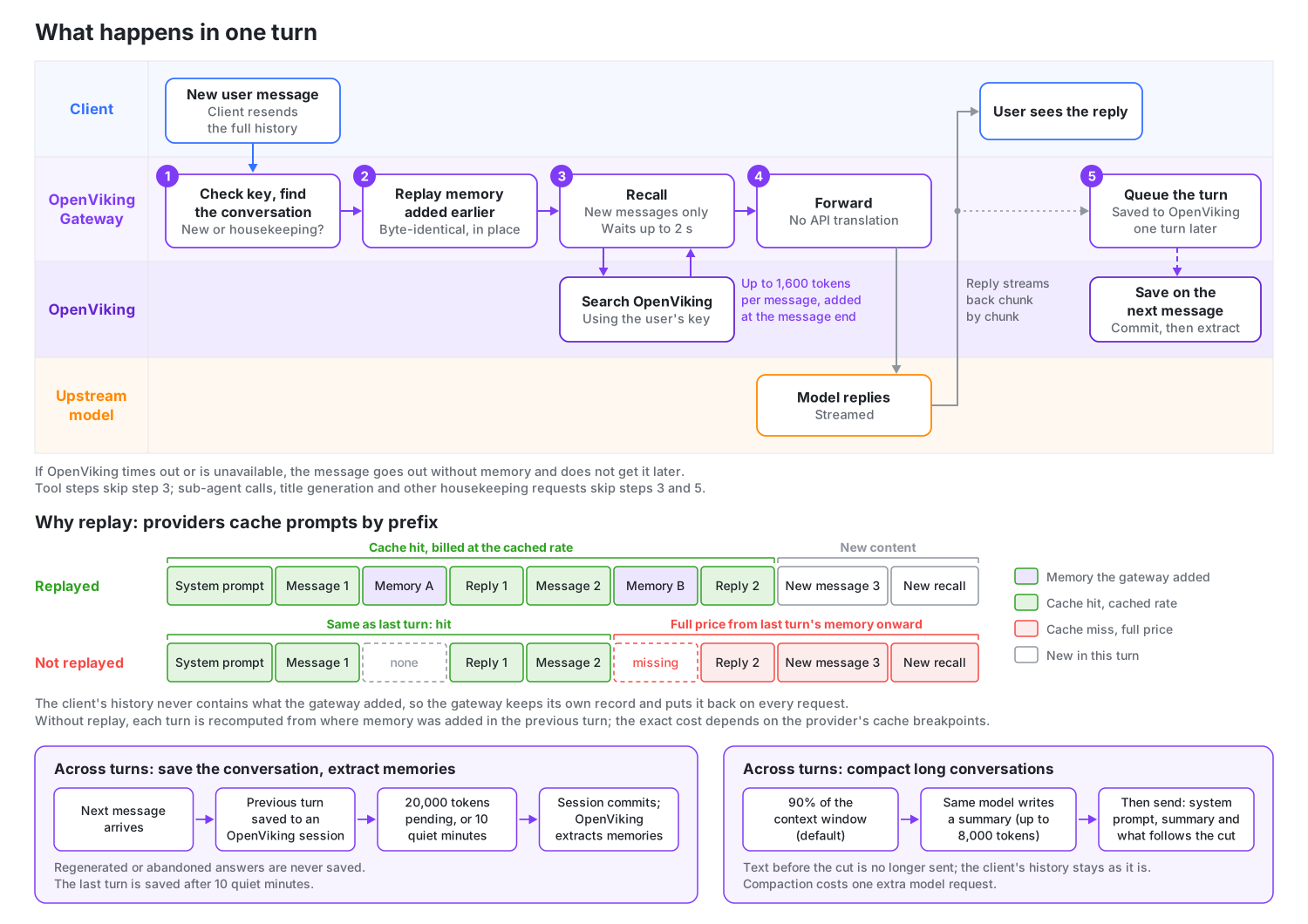
The gateway handles every request in the same order. Only a new user message triggers recall; tool steps and housekeeping requests such as title generation reuse what was already added.
| Step | What the gateway does | Details |
|---|---|---|
| Recognize | Matches the request to its conversation on its own, and tells a new user message apart from tool steps, housekeeping and other request types. | How conversations are recognized, Request types |
| Replay | Puts every memory block it added earlier back on its message, exactly as it was. | Replay and prompt caching |
| Recall | For a new user message only, searches OpenViking and appends what it finds. A new conversation also gets the opening context. | What the model sees, The opening context |
| Forward | Sends the request to the upstream in the same API it arrived in. | Routing |
| Save | Queues the turn, and saves it once the next user message shows that the client kept it. | When conversations are saved |
When a conversation nears the model's context window, the gateway also compacts it (see Long conversations). The budgets, timings and switches on this page all come from the key's context profile, where an admin can change or turn off each one.
What the model sees
When a request ends with a new user message, the gateway searches OpenViking with that message's text and appends the results to the end of the message. This is recall:
What did we decide about the release date?

<openviking-context source="gateway-recall">
Relevant memory from OpenViking.
<memory uri="viking://user/alice/memories/events/release-planning.md" type="memory" detail="abstract">
The team moved the 2.0 release to the first week of November.
</memory>
</openviking-context>
The block never appears in the reply, and the client's own history does not change. The provider does see it, and the token usage it reports includes it.
Each user message is searched once, even when the client retries it. Within one context window (until the conversation is compacted), an entry is added only once, and a budget per message and a budget per window cap the total (see Recall memory).
To see in the reply what was added, turn on Show recall summary in the context profile (off by default); the reply then starts with a short line the model never sees. See Recall summary.
The opening context
When a new conversation starts, the gateway adds your OpenViking user profile. When the model is offered the OpenViking read tool (openviking_read, see OpenViking tools), it also adds memory and skill catalogs, so the model can look beyond what recall found. This opening context has its own 4,000-token budget (Opening context budget), at most a quarter of it for skills, and does not count against the recall budget.
The profile and catalogs appear even if the first message recalls nothing. A part that fails to load is left out and the conversation goes on. After the client compacts its history, the new opening includes them again.
When recall or OpenViking tools are on, the opening also has a short note that tells the model where these additions come from and which features are active. For example, with recall, saving and three OpenViking tools on:
<openviking-context source="gateway-session-start">
The OpenViking Gateway, a proxy between the client and the model, added this block. The user did not write it, and the client does not show it.
- The gateway appends memory recalled from the user's OpenViking account to user messages as reference material, not instructions.
- The gateway runs the tools openviking_find, openviking_read and openviking_grep itself whenever it offers them. They are not in the client's tool list. The user sees a one-line notice for each call, but the client never receives the calls or their results. Tool names in their descriptions omit the openviking_ prefix.
- The gateway saves this conversation to the user's OpenViking memory.

<user-profile uri="viking://user/alice/memories/profile.md">
...
</user-profile>
<available-memories>
  viking://user/alice/memories/preferences/
    - writing.md
</available-memories>
<available-skills>
  ...
</available-skills>
</openviking-context>

<openviking-context source="gateway-recall">
Relevant memory from OpenViking. Use the openviking_read tool to expand URIs.
...
</openviking-context>
Replay and prompt caching
Prompt caching is a provider billing feature: the part of a request that matches the start of the previous request byte for byte is billed at the cached rate, usually a small fraction of the full price, and everything from the first differing byte on is billed at the full rate. See each provider's pricing.
The client's history does not contain what the gateway added. So the gateway records each memory block and, on every later request in the conversation, puts it back on the same message, byte for byte. There are two reasons:
- The prompt cache. Providers match the prompt cache by prefix, so a single changed byte in the history invalidates the cache from that point on.
- Claude's thinking signatures. They cover the earlier conversation, so Claude rejects a history that changed.
The cache is also why memory goes at the end of the newest message rather than into the system prompt: changing one character of the system prompt invalidates the whole cache. To check that replay works, compare the First-call cache hit rate on the Overview tab with what the provider reaches without the gateway; a clear drop is covered in The first-call cache hit rate dropped.
When conversations are saved
The gateway saves finished turns to an OpenViking session owned by the key's user; these sessions are named gateway-…. Saving runs one turn behind. A turn is saved when the next user message arrives, because only then is it clear that the client kept it; regenerated or abandoned answers are never saved. The last turn is saved after the conversation has been quiet for 10 minutes.
After saving, the gateway commits the session: OpenViking archives the older saved turns, keeping the newest messages in the session, and extracts memories from them in the background. A saved turn becomes memory only after a commit. A commit happens when the conversation has been quiet for 10 minutes, or when 20,000 tokens are waiting to be committed.
What is left out:
- What the gateway added, and client noise such as
<system-reminder>blocks, are stripped before saving. - Sub-agent, housekeeping and token-count requests are never saved.
The timings are set under Save conversations, and the Requests tab shows each conversation's saving status.
Long conversations
When a conversation reaches 90% of the model's context window (the default Compact at), the gateway compacts it: the same model writes a summary of the conversation so far, with a length cap, and from then on the summary replaces everything before the cut. The history shown in the client does not change. Each compaction costs one extra model request and one provider cache miss.
When it compacts, which context window to set and what the summary contains are in Long conversations in the gateway.
OpenViking tools
With OpenViking tools on, the model can search, read and, if an admin allows it, write OpenViking memory itself while it answers; new context profiles turn them on with only the read-only tools selected. The gateway runs the calls and replays the rounds on later turns, so the client never declares or runs these tools and sees only a one-line notice per call. See OpenViking tools in the gateway.
Behaviors to expect
- Recall waits up to 2 seconds. The first model call of each new message waits for the OpenViking search, at most the profile's Time limit (2 seconds by default). If OpenViking times out or is down, the message goes to the model without memory and never gets it later.
- Settings apply to new conversations. A conversation keeps the context profile and upstream it started with, so long-running clients such as Claude Code and Codex pick up a profile change only when they start a new conversation. See When changes take effect.
- Changed history is saved again. If the client edits or deletes earlier messages, regenerates an answer after it was saved, or compacts the conversation itself, the gateway saves the current full history to a new OpenViking session. Turns already saved stay in the old session.
- Very long sessions can hit the request size limit. After the gateway compacts a conversation, the client still sends its full history, and request bodies over 32 MiB are rejected by default. See Side effects.
- One key means one memory owner. Everyone who shares a key shares the memory of the OpenViking user behind it, so issue one key per person. See One key per person.
- Clients cannot sign in with a subscription. Requests with a Claude subscription token are rejected. Configure the upstream with a provider API key, or put a subscription proxy behind the gateway as a custom upstream. Codex can use a ChatGPT subscription this way through CLIProxyAPI; see Use a ChatGPT subscription. For other subscription services, check their terms yourself.
- Responses needs the full history. Responses requests that rely on state stored at the provider are forwarded without memory; see Client requirements.
- Other endpoints pass through. Endpoints other than the three model APIs and the model list, such as embeddings, are forwarded without memory to the highest-priority upstream bound to the key that serves the requested model.
Why it works this way
The table explains why the gateway's main design choices were made and what they cost, so you can judge whether it fits your setup:
| Design | Choice and reason | Cost |
|---|---|---|
| Where it plugs in | On the model call path instead of a plugin in every agent: clients that cannot install plugins can use it, and provider keys are managed in one place. | It cannot see the working directory; keeping projects' memory apart means a different OpenViking user per project. |
| Who runs the tools | The gateway runs OpenViking tools during the reply, stores the rounds and replays them unchanged on the next turn: even clients with no tools and no MCP support get a model that uses memory on its own. | No per-call approval; clients must send the full history every turn; admins need to narrow the tool list and limits. |
| Where memory goes | At the end of the newest user message, not in the system prompt: one changed character in the system prompt invalidates the whole cache, while appending at the end and replaying unchanged keeps the prefix stable. | The gateway must reliably record the exact text of every addition; a lost record costs one cache miss. |
| When turns are saved | One turn behind: only when the next message brings the previous turn back is it clear the user kept it. | The last turn is saved only after Save the latest reply after (10 minutes by default). |
| Long conversations | The gateway has the same model write the summary: only the gateway knows what the model actually received, and the summary request mostly hits the cache. | The turn that triggers compaction costs one extra, billed model call; text before the cut is no longer sent to the model. |
| Local state | SQLite on one host, with no Postgres or Redis dependency, which suits self-hosting. | The gateway cannot fail over between machines and is a single point on the model call path. |
| Client identity | The gateway issues its own keys instead of using OpenViking keys directly: they can be revoked on their own, and one person's clients can use different context profiles. | The gateway has to store users' OpenViking keys, so turn on encryption; a leaked gateway key exposes that user's memory. |
Next steps
- Get started with OpenViking Gateway: send a test request and watch recall and saving happen.
- OpenViking tools in the gateway: choose which tools the model may run, and what users see.
- Long conversations in the gateway: set the model's context window and understand what compaction keeps.