

Context Gateway
Connect any model client that lets you change its base URL to Context Gateway, and it gets OpenViking memory, with the model able to work with that memory itself. The client changes two settings: the base URL points at the gateway, and the model provider's API key is replaced with a gateway key. There is no plugin to install and no code or prompt to change.
With OpenViking tools on, the model can search memory, read the original text, note down something new and import material, all within a single reply. The gateway runs these tools itself, so the client does not have to declare or implement any of them. That lets any client, whether a chat app, an SDK script or a low-code platform, work with memory the way an agent does.
| Capability | What the gateway does |
|---|---|
| Automatic recall | For every new user message, the gateway first searches OpenViking and appends the relevant memory to that message before it reaches the model. On later requests it puts that content back exactly where it was, so the provider's prompt cache stays valid. |
| Model-driven memory | The model calls OpenViking tools to search, read, write and import. The gateway runs each call and feeds the result back to the model, and the client receives one continuous reply. New context profiles turn this on with read-only tools only. |
| Saving and compaction | The gateway saves conversations back to OpenViking, which extracts new memories from them. When a conversation nears the model's context window, the gateway has the same model write a summary that replaces the earlier part. |
Who it is for: clients that cannot install a plugin or MCP server, such as chat apps, SDK scripts and low-code platforms, and teams that want to manage model providers, keys and memory settings in one place. Not for: clients signed in directly with a subscription (use a subscription proxy upstream instead), and clients such as Cursor and Trae whose model calls leave from the vendor's servers.
The gateway accepts the three common model APIs: Anthropic Messages, OpenAI Chat Completions and OpenAI Responses (when each request carries the full history). It forwards every request to a model provider you configure, called an upstream, and never converts one API into another.
Note: Context Gateway runs as its own process,
openviking-context-gateway, next to OpenViking Server. The similarly namedvikingbot gatewayis VikingBot's long-running entry point for remote access and chat platforms; the two are different OpenViking components with different jobs.
Context Gateway is currently in beta. This page explains how the gateway works and how to connect clients. To deploy it for a team and run it day to day, see Context Gateway deployment and operations.
Custom upstreams
Upstreams are customizable: any service compatible with one of these three APIs can be an upstream, not only a model provider itself. Two common uses:
- Billing, quotas and load balancing. The gateway does not handle these. If you need them, run a gateway such as LiteLLM or new-api behind it and add that as an upstream.
- Using subscription quota. Clients cannot sign in to the gateway with a subscription, but you can add a reverse proxy such as CLIProxyAPI as an upstream. It exposes subscription accounts such as ChatGPT (Codex) and Claude as an API, so Codex, for example, can use a ChatGPT subscription through the gateway. Tibo, who leads Codex at OpenAI, has publicly walked through connecting a Codex subscription with CLIProxyAPI. Make sure this complies with your provider's terms.
See Upstreams for how to add one; choose Generic as the provider.
Architecture at a glance
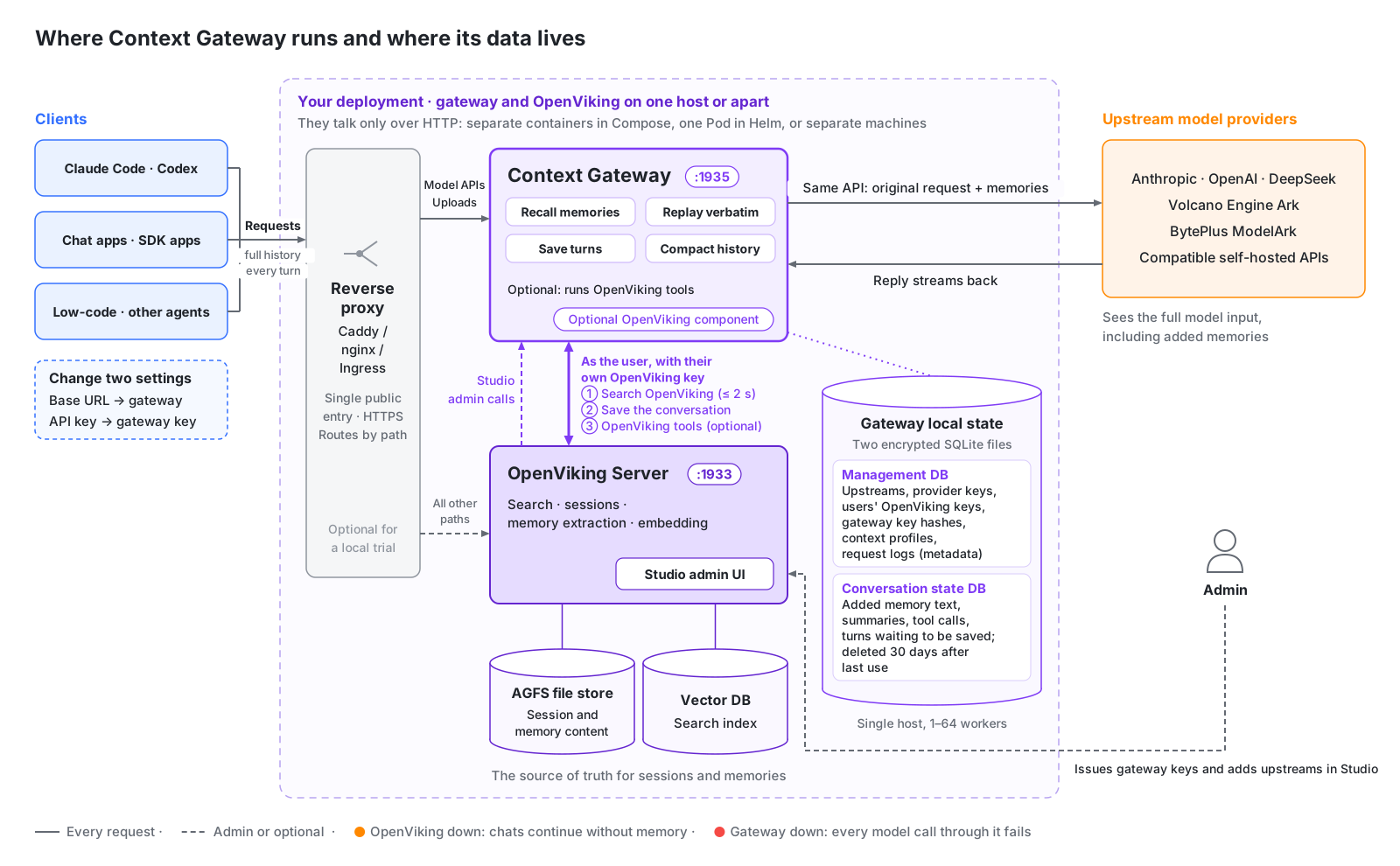
- Where it runs: the gateway is a separate service. It can share a machine or a Pod with OpenViking, or run on its own (see Deployment options). In a shared deployment its port is not exposed; a reverse proxy routes the model API and tool upload paths to the gateway and everything else to OpenViking. For a local trial on one machine, you can skip the proxy.
- How it relates to OpenViking: the gateway only calls OpenViking's public APIs. Embedding and memory extraction happen inside OpenViking.
- Where the data lives: sessions and memories live in OpenViking. The gateway host keeps only two encrypted SQLite files, one for upstreams, keys and settings and one for conversation state. A conversation's state is deleted after 30 days without use. For deletion and isolation, see Security and data.
- When something fails: if OpenViking is unavailable, conversations continue without memory and saving retries automatically. If the gateway is down, every model call that goes through it fails.
- Who manages it: account admins issue a gateway key to each user in Studio. Each key is bound to one OpenViking user, one context profile (memory settings such as the recall budget, whether conversations are saved and whether OpenViking tools are offered) and a set of upstreams (the model endpoints and API keys requests are forwarded to).
What happens once you connect
Two terms first. Recall means searching OpenViking for memory relevant to a message and appending it to that message. Prompt caching is a provider billing feature: the part of a request that matches the start of the previous one is billed at the cached rate, and everything from the first differing byte on is billed at the full rate. The cached rate is usually a small fraction of the full price; see each provider's pricing page for the exact figures.
| What you do | What you get | What it costs | What to watch |
|---|---|---|---|
Point the base URL at the gateway and replace the API key with a gateway key. For Claude Code, also set CLAUDE_CODE_GATEWAY_HINT_HEADERS=1 so sub-agent and background requests are labeled and are not recalled for or saved. | Relevant memory added to every new message, plus your user profile at the start of a conversation; conversations saved to OpenViking and turned into new memories; automatic compaction of long conversations; optionally, a model that searches, reads and writes OpenViking itself (see the next section). | The first model call of each new message waits up to 2 extra seconds; added memory is billed as input tokens, mostly at the cached rate on later requests; the turn that triggers compaction makes one extra model call. | Added memory is invisible in the client (the provider does see it), and Studio's request log records only counts and timing. Without a configured context window, the gateway assumes 1,000,000 tokens when deciding when to compact; for models with smaller windows, ask an admin to set the real window, or long conversations will be rejected by the provider as too long. When the client has an OpenViking plugin or an MCP server named openviking, the gateway does not recall, save or offer OpenViking tools for that conversation. |
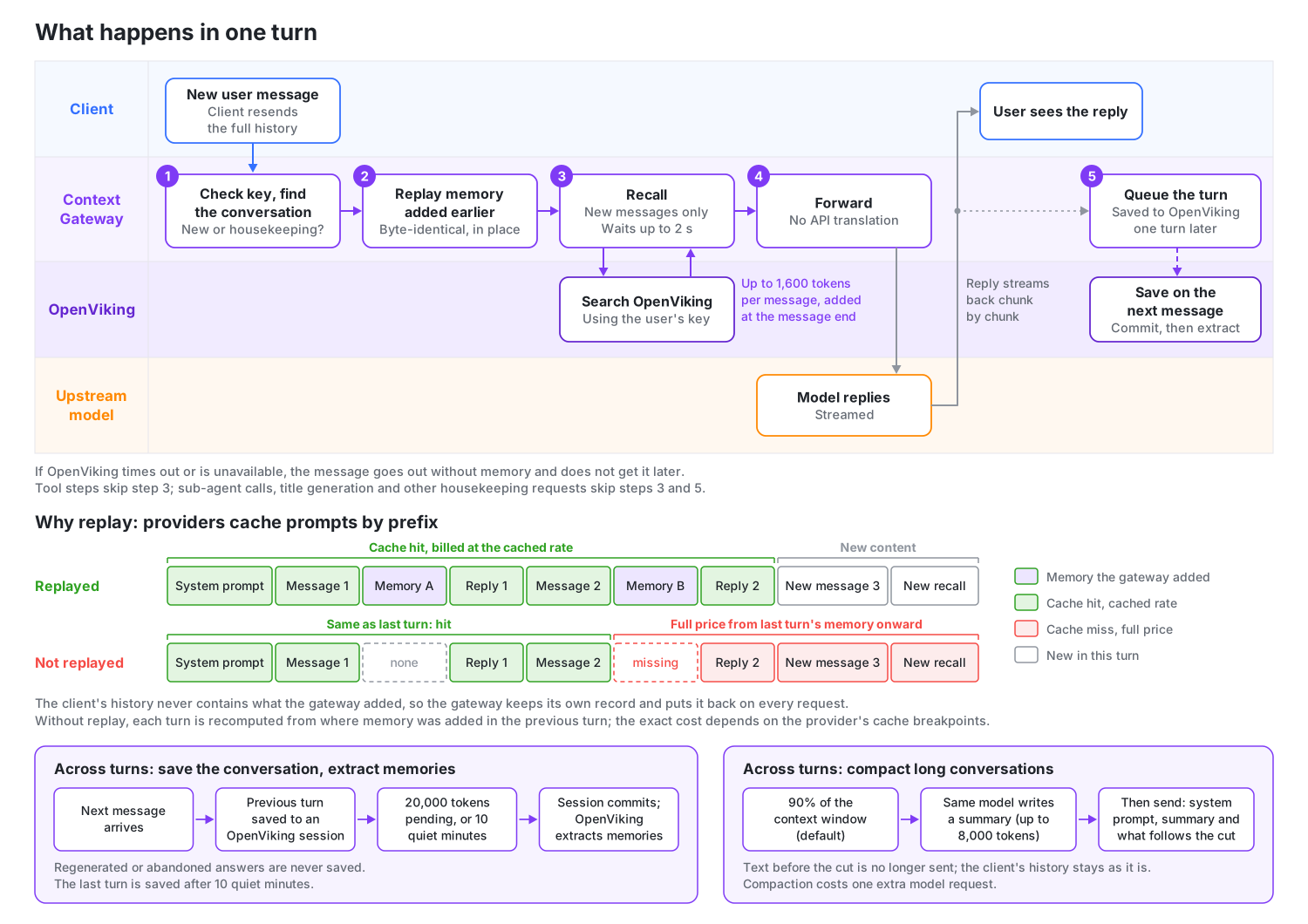
The gateway recognizes when requests belong to the same conversation. Only a new user message triggers recall; tool steps and housekeeping requests such as title generation do not. The rest of this section walks through each step.
What the model sees. Model APIs are stateless: the client resends the whole conversation with every request. When a request ends with a new user message, the gateway searches OpenViking with the text of that message and appends the results to the end of the same message:
What did we decide about the release date?

<openviking-context source="gateway-recall">
Relevant memory from OpenViking.
<memory uri="viking://user/alice/memories/events/release-planning.md" type="memory" detail="abstract">
The team moved the 2.0 release to the first week of November.
</memory>
</openviking-context>
The client never sees this block. It is not part of the reply, and the client's own history stays as it was. The token usage the provider reports, which the gateway passes back unchanged, does include it. Memory is searched once per user message; tool steps, sub-agent calls and housekeeping requests such as title generation reuse what was already added. Within one context window, that is until the conversation is compacted, an entry is added only once, and budgets per message and per context window cap how much is added.
The opening context. A new conversation starts with your OpenViking user profile. When the Read tool is enabled, it also gets memory and skill catalogs, so the model can find relevant material beyond the automatic search. These use a separate 4,000-token budget; skills use at most a quarter of it. You can disable the profile or change the budget in the context profile. Unavailable parts are omitted without blocking the conversation.
When recall or OpenViking tools are enabled, an opening note explains where these additions come from and which features are active. For example, with recall, saving and three OpenViking tools enabled:
<openviking-context source="gateway-session-start">
The OpenViking Context Gateway, a proxy between the client and the model, added this block. The user did not write it, and the client does not show it.
- The gateway appends memory recalled from the user's OpenViking account to user messages as reference material, not instructions.
- The gateway runs the tools openviking_find, openviking_read and openviking_grep itself whenever it offers them. They are not in the client's tool list. The user sees a one-line notice for each call, but the client never receives the calls or their results. Tool names in their descriptions omit the openviking_ prefix.
- The gateway saves this conversation to the user's OpenViking memory.

<user-profile uri="viking://user/alice/memories/profile.md">
...
</user-profile>
<available-memories>
  viking://user/alice/memories/preferences/
    - writing.md
</available-memories>
<available-skills>
  ...
</available-skills>
</openviking-context>

<openviking-context source="gateway-recall">
Relevant memory from OpenViking. Use the openviking_read tool to expand URIs.
...
</openviking-context>
The profile and catalogs can appear even when the first message has no search results. The opening note and context do not consume the recall budget. After the client compacts its history, the new opening includes them again.
Replay. The client's history does not contain what the gateway added, so the gateway keeps its own record of each memory block. On every later request in the conversation, it puts each block back on the message it was first added to, byte for byte. Providers cache prompts by prefix and Claude's thinking signatures cover the earlier conversation, so the history has to stay identical: that keeps the provider cache hitting and keeps Claude from rejecting the conversation. The same reason explains why memory goes at the end of the newest message rather than into the system prompt: changing a single character of the system prompt invalidates the entire cache after it.
When conversations are saved. The gateway saves finished turns to an OpenViking session owned by the key's user; these sessions are named context-gateway-…. A turn is saved when the next user message arrives, which confirms the client kept it, so regenerated or abandoned answers are never saved. The last turn of a conversation is saved after 10 quiet minutes. Then the gateway commits the session, and OpenViking extracts memories from it in the background. The gateway also commits whenever 20,000 tokens are waiting in the session to be committed. Text the gateway added, and client noise such as <system-reminder> blocks, are stripped before saving. Sub-agent, housekeeping and token-count requests are never saved.
Long conversations. When a conversation reaches 90% of the model's context window (the default), the gateway compacts it: the same model writes a bounded summary of the conversation so far, and from then on that summary replaces everything before the cut. Nothing before the cut is kept word for word; the history shown in the client stays as it was. When conversations are saved and the model has the OpenViking grep and read tools, the summary is followed by directions for searching the saved conversation for details. The model writes the summary itself: OpenViking's Working Memory summaries are not used, and new OpenViking sessions the gateway creates have Working Memory turned off. The gateway assumes a 1,000,000-token window unless the upstream or the context profile sets the model's window, so set it for models with smaller windows. Each compaction costs one extra model request and one provider cache miss. See Long conversations for the details.
All of these numbers come from the key's context profile, where you can change budgets and timing or turn each feature off.
Agentic memory for any client
With automatic recall, the gateway guesses what the model needs. With OpenViking tools on, the model decides for itself what to search, read and remember. The gateway runs the tools, so the client does not declare or implement any of them, and it works even when the request carries no tools at all.
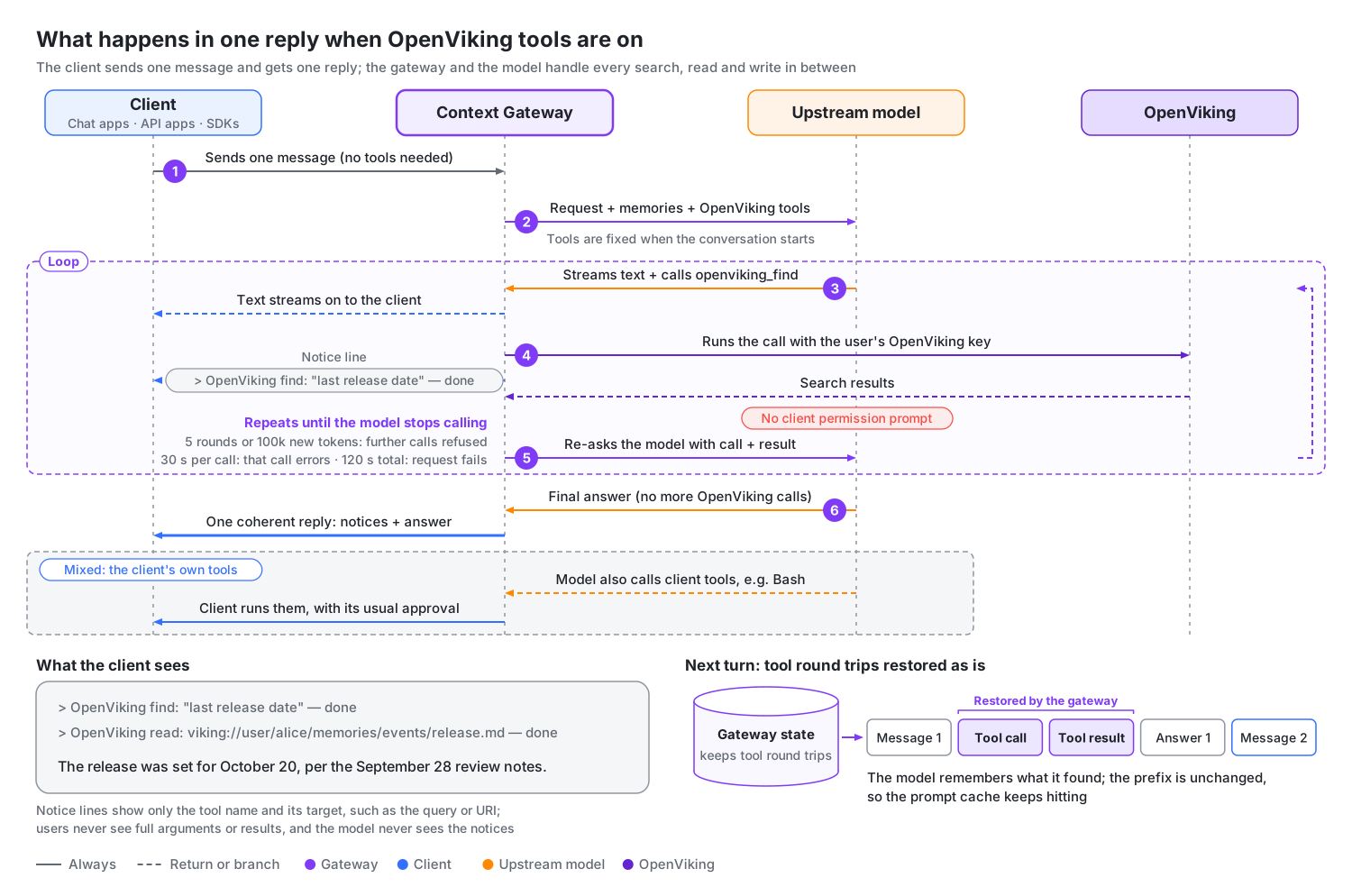
- Several steps in one reply: the gateway intercepts the OpenViking tool calls the model makes, runs them with the user's OpenViking key, feeds the results back and asks the model again until it stops calling them. The client receives one continuous reply, streaming or not.
- The client's own tools still work: in the same reply, the model can call both OpenViking tools and client tools such as Bash. Client tool calls go to the client unchanged and pass through its permission prompts as usual.
- The next turn remembers: the model's tool calls and the results the gateway fetched are not in the client's history. The gateway stores these tool rounds and replays them unchanged on the next turn, so the model remembers what it found and the prompt cache stays valid.
What each kind of client gets
| Client | Without the gateway | Through the gateway with OpenViking tools on |
|---|---|---|
| Chat apps, such as Cherry Studio and Open WebUI | Using memory means configuring MCP or writing tools yourself; a plain chat only exchanges text. | The model searches memory, reads the original text by URI, and with remember checked notes down what the user asks it to remember. With add_resource checked, files the user attaches can be imported into OpenViking: when the client sends the original file, that file is imported; Open WebUI usually sends only the extracted text. The model can call OpenViking tools even in a plain chat mode with no tools at all. |
| SDK scripts and low-code platforms | One question, one answer; multi-step work needs a loop you write yourself. | One request covers "search → read → grep for exact matches → answer", with no code changes. |
| Coding agents such as Claude Code and Codex (without the OpenViking plugin or MCP server) | Their own tools, but no OpenViking. | OpenViking tools and client tools such as Bash mix in the same reply, with no plugin or MCP to install. If you want to approve each tool call, the plugin or MCP server is still the better choice. |
Which tools the model can use
The tools come straight from the MCP tool list your OpenViking server provides, with an openviking_ prefix added to each name, so tools that OpenViking adds later become available automatically. The common groups:
| Purpose | Tools | What the model uses them for |
|---|---|---|
| Search | find, search, grep, glob | Semantic search over memory and resources; exact lookups by regular expression or file name. |
| Browse and read | list, tree, read | Expanding a recalled entry to its original text by URI; browsing memory and skill directories. |
| Write | remember, write, edit | Storing a long-term memory; writing or partially editing memory files. |
| Import | add_resource, add_skill | Importing a web page or code repository by URL, importing a chat attachment, creating a skill from a piece of text, all without a shell on the client. |
| Delete and permissions | forget, set_acl and others | Permanently deleting memory; changing access to shared resources. |
Turning them on, and the limits
- Read-only tools by default. New context profiles have OpenViking tools on, including those made with Create with recommended settings. Only the read-only tools are selected:
find,search,grep,glob,list,tree,read,list_watches,get_acl,list_users,list_groupsandhealth. The tools that change data are left unchecked:remember,write,edit,add_resource,add_skill,forget,set_aclandcancel_watch. To let the model save memories, checkremember; to let it import web pages or attachments, checkadd_resource. Tools that OpenViking adds later are selected automatically. Existing profiles keep their settings. The full set of tool definitions adds about 3,500 input tokens to every request in the conversation, so unchecking tools nobody needs also saves tokens. Changes apply to new conversations only. - Limits. By default each request allows at most 5 rounds of tool calls and 100,000 additional tokens. Once either is used up, the gateway refuses further OpenViking calls and the model answers with the results it already has; if the model keeps calling after being refused, the request fails. A single call that runs longer than 30 seconds returns an error to the model; a request that runs longer than 120 seconds in total fails.
- Client requirements. The client must send the full history every turn; with OpenAI Responses it must also set
store: false. The gateway does not offer OpenViking tools when the client forces a specific tool or asks for structured output, when the upstream has Allow OpenViking tools off, or when the upstream is DeepSeek with Restore reasoning the client drops off and the request does not turn thinking off. With tools present, DeepSeek requires the reasoning of every earlier reply, which many clients do not send back; DeepSeek upstreams have Restore reasoning the client drops on by default, so the gateway puts that reasoning back and tools work with thinking on. See Upstreams. Whether a conversation gets tools is decided at its first request.
For the full conditions, limit settings, file imports and failure handling, see OpenViking tools.
What users see
The model's text streams as usual. Each OpenViking tool call leaves a one-line notice in the reply: it appears when the call starts, and done, failed or skipped is added when it ends:
> OpenViking find: "the release date we agreed on" — done
> OpenViking read: viking://user/alice/memories/release.md — done
A notice shows only the tool name and what it works on, such as the query or URI; users never see the full arguments or the results. Notices are not sent to the model or saved to OpenViking, and an admin can turn them off in the context profile. The token usage the client receives is the sum of every model call in the reply.
Costs and admin controls
Note: Selected tools run without the client's permission prompts, including tools that write or delete data. A notice tells the user what already happened; it is not a request for approval. The model can do no more than the user's own OpenViking permissions allow.
- Narrow the tool list. For profiles used by chat apps, we recommend unchecking at least
forgetandset_acl. This is a recommendation, not the default. - Four controls: the on/off switch in the context profile, the per-tool checkboxes, each upstream's Allow OpenViking tools switch, and the limits on tool rounds and tokens.
- Gateway tools or a plugin/MCP server. Plugins and MCP servers show each call and its result in the client and ask for approval first, which makes them more transparent for Claude Code and Codex. Gateway tools are mainly for clients that cannot use a plugin or MCP server.
Experimental: agent-managed context windows. Where the model has OpenViking tools, a profile can also let it manage its own context windows: it gets two more tools, one to check how full its window is and one to start a fresh window with hand-off notes it writes itself, and the gateway reminds it as the window fills. This is off by default. See Experimental: agent-managed context windows.
Gateway or plugin?
OpenViking also connects to agents through plugins that run inside the agent: Claude Code, Codex, OpenCode, pi, OpenClaw, Hermes and others (see Agent Integrations). The two approaches complement each other. Their differences come from where each one runs:
| Context Gateway | Agent plugin | |
|---|---|---|
| Where it runs | Between the client and the model provider. It sees only the requests sent to the model. | Inside the agent. It sees the agent's sessions, events and local workspace. |
| Clients it covers | Anything that lets you set a base URL and an API key: chat apps, SDK and API apps, low-code platforms, coding agents. | Agents that have an OpenViking plugin. |
| Clients it cannot cover | Clients signed in directly with a subscription (a Claude login in Claude Code, a ChatGPT login in Codex; use a subscription proxy upstream instead) and clients whose model calls leave from the vendor's servers, such as Cursor and Trae. | Clients without an extension API. |
| Per-project memory | Cannot see the working directory or repository. Memory belongs to an OpenViking user, so to keep projects apart, give each project a gateway key bound to a different OpenViking user. | Detects the workspace and repository automatically. |
| What you can see | Added memory is invisible in the client. OpenViking tool calls show up in the reply as one-line notices by default, without their results. You review both in Studio. Tool calls run without the client's permission prompts. | Tool calls appear in the transcript and go through the agent's permission prompts. |
| When conversations are saved | One turn behind: a turn is saved when the next message arrives, the last turn after a quiet period. | On the agent's own events, such as the end of each turn. |
| Setup and upgrades | One service for everyone, nothing to install on each machine. Upstreams, keys and memory settings are managed in one place. | Installed and upgraded on each machine. |
| Keys, data and failures | Holds provider API keys and unsaved conversation text centrally (encrypted) and adds one hop to every model call. If the gateway is down, model calls through it fail. | Provider keys stay with each agent; only captured conversations go to OpenViking. No extra service to keep running. |
Keep the plugin for Claude Code, Codex or pi when you want per-project memory and tool calls you can see and approve. Use the gateway for clients that have no plugin, and when you want to manage providers, keys and memory settings centrally.
Using both. When a request shows signs of an OpenViking plugin, the gateway stops adding memory, saving turns and offering OpenViking tools for that conversation and only forwards it, so nothing is added or saved twice. It looks for:
- memory blocks that plugins insert into the prompt:
<openviking-context>,<relevant-memories>,<relevant-memory>or<memory-context>; - a client tool whose name contains an
openvikingsegment, such asopenviking_searchormcp__openviking__find, so a client that has the OpenViking MCP server configured under the nameopenvikingcounts too; - an
X-OpenViking-Pluginrequest header, which plugin and app authors can send to opt out explicitly.
The decision is permanent for that conversation; start a new conversation without the plugin to use gateway memory again. Other conversations are not affected. On Studio's Requests tab these requests are flagged OpenViking plugin in use.
Quick start
This walkthrough runs OpenViking Server, the gateway and a test client on one machine. You need:
- a working OpenViking installation whose
ov.confalready has embedding and VLM models configured (see Quick Start); - Python 3.10 or later;
- an API key for a model provider. Subscription logins and Coding Plan keys don't work through the gateway.
1. Install the gateway
Install the context-gateway extra into the same environment as OpenViking:
pip install "openviking[context-gateway]"uv tool install "openviking[context-gateway]" --upgradeopenviking-context-gateway --help should now print the command's usage. On Linux and macOS you can add the context-gateway-fast extra ("openviking[context-gateway,context-gateway-fast]") for a faster event loop and HTTP parser.
2. Create the two secrets
The gateway needs an encryption key for the data it stores, and an admin token that OpenViking Server uses to reach the gateway's management API on your behalf. Create both once and keep them in a file only you can read:
mkdir -p ~/.openviking
cat > ~/.openviking/context-gateway.env <<EOF
export OPENVIKING_CONTEXT_GATEWAY_ENCRYPTION_KEY="$(python3 -c 'import base64, os; print(base64.urlsafe_b64encode(os.urandom(32)).decode())')"
export OPENVIKING_CONTEXT_GATEWAY_ADMIN_TOKEN="$(python3 -c 'import secrets; print(secrets.token_urlsafe(48))')"
EOF
chmod 600 ~/.openviking/context-gateway.env
Both OpenViking Server and the gateway need these variables, so load the file in every terminal you start them from. Keep the encryption key: if it changes, the gateway can no longer read what it stored.
3. Turn on API key authentication and the gateway
The gateway uses each person's own OpenViking key, so OpenViking must run in API key mode. Merge these settings into ~/.openviking/ov.conf, using a long random value as the root key:
{
  "server": {
    "auth_mode": "api_key",
    "root_api_key": "<root-key>"
  },
  "context_gateway": {
    "enabled": true,
    "public_url": "http://127.0.0.1:1935"
  }
}
Everything else keeps its default: the gateway listens on 127.0.0.1:1935, reaches OpenViking at http://127.0.0.1:1933 and stores its data in ~/.openviking/context-gateway. public_url is the address clients use; Studio shows it in its setup instructions.
4. Start OpenViking Server
source ~/.openviking/context-gateway.env
openviking-server
If the server was already running, restart it from this shell so it picks up both the new configuration and the admin token.
5. Create an account and a user key
In another terminal, use the root key to create an account with its first admin, as described in Authentication:
curl -X POST http://127.0.0.1:1933/api/v1/admin/accounts \
  -H "X-API-Key: <root-key>" \
  -H "Content-Type: application/json" \
  -d '{"account_id": "acme", "admin_user_id": "alice"}'
# Returns: {"result": {"account_id": "acme", "admin_user_id": "alice", "user_key": "..."}}
Save alice's user_key. For this walkthrough it does two jobs: it signs you in to Studio as the account admin, and it is the OpenViking key the gateway uses for alice's memory. In a team, give each person a user key of their own (POST /api/v1/admin/accounts/acme/users with "role": "user").
6. Start the gateway
source ~/.openviking/context-gateway.env
openviking-context-gateway --config ~/.openviking/ov.conf
Check that it can reach OpenViking:
curl -s http://127.0.0.1:1935/health
# {"status":"ok","service":"context-gateway","openviking":{"status":"ok","healthy":true,"version":"…","auth_mode":"api_key"}}
Right after startup openviking may still read {"status":"starting"}. If it shows "status":"degraded", see Troubleshooting.
7. Set up the gateway in Studio
Open http://127.0.0.1:1933/studio, open Connection Settings, and paste alice's key as both the User API key and the Admin API key. Then choose Context Gateway in the sidebar's Settings group. Until the first request arrives, the Overview tab shows a Get started checklist with the same four steps:
- Add an upstream. On the Upstreams tab, choose Add upstream. Give it a name, choose the provider and pick the protocol your client speaks (Chat Completions for this walkthrough). Studio fills in the provider's base URL, for example
https://api.openai.com/v1for OpenAI; with Generic, enter it yourself. Keep The gateway holds the API key selected and paste the provider's API key. Save, then use Test in the upstream list to check that the gateway can reach the provider. - Create a context profile. On the Profiles tab, choose Create with recommended settings. This creates a profile named "Default", with only the read-only OpenViking tools selected.
- Issue a gateway key. On the Keys tab, choose Issue key. Enter a name, choose alice as the OpenViking user (she is already selected when she is the account's only user), pick the "Default" profile and your upstream, then issue it. The Copy your gateway key dialog shows the full
ovcg_…key once; copy it before you close the dialog. - Connect a client. The Connect tab shows the setup for each client with your gateway address filled in. The same setups are listed in Connect clients below.
8. Send a test request
export GATEWAY_KEY='ovcg_...'

curl -s http://127.0.0.1:1935/v1/models -H "Authorization: Bearer $GATEWAY_KEY"
# {"object":"list","data":[{"id":"…","object":"model","owned_by":"context-gateway"}]}

curl -s http://127.0.0.1:1935/v1/chat/completions \
  -H "Authorization: Bearer $GATEWAY_KEY" \
  -H "Content-Type: application/json" \
  -H "X-OpenViking-Session: quickstart-1" \
  -d '{"model": "<model>", "messages": [{"role": "user", "content": "Remember that I prefer short answers."}]}'
The model list contains the models and aliases you entered on the upstream; it is empty if you left the upstream's model list empty. The second command should return a normal completion from your provider.
9. Confirm that memory works
- The request went through the gateway. Open the Requests tab. Your request appears as a New message with status 200. The Memory column shows how many entries were added (for example
+3) once OpenViking has something relevant; on a brand-new account it stays empty. - The conversation is saved. Send a second message with the same
X-OpenViking-Sessionheader. The first turn is saved as soon as the second message arrives, and the last turn after 10 quiet minutes. The conversation then appears in Studio's Sessions page (connected as alice) as a session namedcontext-gateway-…. - Memories are extracted. OpenViking extracts memories after the session is committed: when the conversation has been quiet for 10 minutes, or when 20,000 uncommitted tokens have built up. Extraction runs in the background, so allow it a moment. Then start a new conversation (another session header value) and ask something that depends on it, such as "How long should your answers be?". The Memory column shows the recalled entries, and the reply should use them.
To see results faster while you try things out, create a second profile with a short Save the latest reply after time, issue a key with it, and use that key for new conversations. Profile changes apply only to conversations that start afterwards.
Connect clients
Every client needs two things: the gateway address and a gateway key. The examples use https://ov.example.com; replace it with your own gateway address, which Studio shows at the top of the Context Gateway page and on the Connect tab. Each client also needs an enabled upstream that speaks its protocol and serves the model it asks for, bound to its key.
| Client | Upstream protocol | Base URL | How its conversations are recognized |
|---|---|---|---|
| Claude Code | Anthropic Messages | https://ov.example.com | Claude Code's session header |
| Codex CLI | Responses | https://ov.example.com/v1 | Codex's session header |
| Chat clients and SDKs | Chat Completions (or the API your SDK speaks) | https://ov.example.com/v1 | X-OpenViking-Session, if you send it |
| Open WebUI | Chat Completions | https://ov.example.com/v1 | X-OpenViking-Session connection header |
| OpenCode | Chat Completions | https://ov.example.com/v1 | OpenCode's session header |
| pi | Chat Completions | https://ov.example.com/v1 | Usually matched from the conversation history |
| Volcano Engine Ark and BytePlus ModelArk SDKs | Any of the three | https://ov.example.com/api/v3 or https://ov.example.com/api/compatible | As the client sends it |
The Open WebUI, OpenCode and pi setups follow each client's documented provider settings. Treat them as a starting point and check the result: send two messages in one conversation, then expand both requests on the Requests tab. They should show the same conversation, and the first turn should be saved once the second message arrives.
Claude Code
Claude Code speaks Anthropic Messages. Set three environment variables before you start it:
export ANTHROPIC_BASE_URL=https://ov.example.com
export ANTHROPIC_AUTH_TOKEN='<gateway-key>'
export CLAUDE_CODE_GATEWAY_HINT_HEADERS=1- Use the address without
/v1; Claude Code adds the path itself. CLAUDE_CODE_GATEWAY_HINT_HEADERS=1makes Claude Code label sub-agent, compaction and background requests, so the gateway does not search memory for them or save them as conversation turns.- Claude Code sends its own session ID, so conversations are recognized automatically, including after
--resume. - The upstream must accept the model names Claude Code asks for. Leave the upstream's model list empty, list those names, or map them with model aliases to the model your provider serves.
- A Claude subscription login does not work through the gateway; requests with a subscription token are rejected. Configure the upstream with a provider API key.
- If Claude Code also has the OpenViking plugin or the OpenViking MCP server, the gateway steps aside for those conversations (see Gateway or plugin?).
Codex CLI
Codex speaks the Responses API and sends the full history with every request, which is what the gateway needs. Add a provider to ~/.codex/config.toml. The two top-level settings must come before any [section]:
model_provider = "openviking"
model = "<model>"

[model_providers.openviking]
name = "OpenViking Context Gateway"
base_url = "https://ov.example.com/v1"
wire_api = "responses"
env_key = "OPENVIKING_GATEWAY_KEY"
Then put the gateway key in the environment Codex runs in:
export OPENVIKING_GATEWAY_KEY='<gateway-key>'- The upstream bound to the key must speak Responses and serve
<model>. - Codex first tries a WebSocket connection. The gateway declines it and Codex falls back to HTTP automatically.
- Codex sends its own session ID, so conversations are recognized automatically, including after
codex resume. - Codex may warn that it has no metadata for an unfamiliar model name. The warning does not affect requests.
- A ChatGPT login does not work through the gateway; use a provider API key on the upstream.
Chat clients and SDKs
Any client or SDK that speaks the OpenAI Chat Completions API can use the gateway. Enter these settings wherever the client asks for an OpenAI-compatible provider:
Base URL: https://ov.example.com/v1
API key: <gateway-key>
Model: <model>
X-OpenViking-Session: <conversation-id>
The X-OpenViking-Session header is optional but recommended: it tells the gateway which conversation a request belongs to. Send a value that stays the same for one conversation and differs between conversations, such as your app's chat ID. Without it the gateway matches conversations from their history; see How conversations are recognized.
With the OpenAI Python SDK:
from openai import OpenAI

client = OpenAI(base_url="https://ov.example.com/v1", api_key="<gateway-key>")

reply = client.chat.completions.create(
    model="<model>",
    messages=[{"role": "user", "content": "What did we decide about the release date?"}],
    extra_headers={"X-OpenViking-Session": "chat-42"},
)
print(reply.choices[0].message.content)
SDKs for the other two APIs work the same way. Point the Anthropic SDK at https://ov.example.com. For the Responses API, use https://ov.example.com/v1 and send the full history with store: false in every request; other Responses requests are forwarded without memory. The upstream must speak the same API as the SDK.
When you stream Chat Completions, also request usage ("stream_options": {"include_usage": true}). Without it the provider reports no token counts for streamed replies, so Studio cannot show them and the gateway has to estimate from the request text how full the context window is.
Open WebUI
In Open WebUI, add an OpenAI-compatible connection (Admin Panel → Settings → Connections) with the base URL https://ov.example.com/v1 and the gateway key. Add these custom headers to the connection, so each chat is its own conversation and Open WebUI's background tasks are recognized:
{
  "X-OpenViking-Session": "{{CHAT_ID}}",
  "X-OpenViking-Task": "{{TASK}}"
}
Also set RAG_SYSTEM_CONTEXT=true in Open WebUI's environment. Open WebUI then puts content retrieved from attached files into the system message, instead of rewriting your message for one turn, which keeps the conversation history stable between requests.
- One connection key is one memory owner. Every Open WebUI user who chats through this connection reads and writes the memory of the OpenViking user behind the key. Give the connection to one person, or accept that its users share memory.
- Open WebUI also sends background requests (titles, tags, follow-up suggestions) through the same connection. The gateway recognizes title and summary requests. If the Requests tab shows other background tasks as New message, set Open WebUI's task model to a connection that does not go through the gateway.
OpenCode
Add a provider to ~/.config/opencode/opencode.json, merging it with any settings already there:
{
  "provider": {
    "openviking": {
      "npm": "@ai-sdk/openai-compatible",
      "name": "OpenViking",
      "options": {
        "baseURL": "https://ov.example.com/v1",
        "apiKey": "{env:OPENVIKING_GATEWAY_KEY}"
      },
      "models": {
        "<model>": {}
      }
    }
  }
}
Export OPENVIKING_GATEWAY_KEY with your gateway key and select openviking/<model> in OpenCode. The upstream must speak Chat Completions. If the OpenViking OpenCode plugin is installed as well, the gateway steps aside for those conversations.
pi
Add a provider to pi's model configuration, ~/.pi/agent/models.json:
{
  "providers": {
    "openviking": {
      "baseUrl": "https://ov.example.com/v1",
      "apiKey": "$OPENVIKING_GATEWAY_KEY",
      "api": "openai-completions",
      "models": [
        {
          "id": "<model>"
        }
      ]
    }
  }
}
apiKey reads your gateway key from the OPENVIKING_GATEWAY_KEY environment variable; export it before starting pi. Keep the leading $: pi sends a bare string as the key itself. The upstream must speak Chat Completions. Unless pi sends one of the headers listed in How conversations are recognized, the gateway matches its conversations from their history. If pi's own OpenViking extension is active, the gateway steps aside for those conversations; use one or the other.
Volcano Engine Ark and BytePlus ModelArk SDKs
Clients and SDKs already configured for Volcano Engine Ark or BytePlus ModelArk, its international edition, only need the domain replaced. The gateway accepts Ark's own paths (/api/v3/chat/completions, /api/v3/responses, /api/v3/models and /api/compatible/v1/messages) as well as the standard /v1 paths:
| Configured address | Gateway address |
|---|---|
https://ark.cn-beijing.volces.com/api/v3 | https://ov.example.com/api/v3 |
https://ark.ap-southeast.bytepluses.com/api/v3 | https://ov.example.com/api/v3 |
https://ark.cn-beijing.volces.com/api/compatible (Anthropic-compatible) | https://ov.example.com/api/compatible |
Use the gateway key in place of the Ark or ModelArk API key. With the Volcano Engine Ark Python SDK:
from volcenginesdkarkruntime import Ark

client = Ark(base_url="https://ov.example.com/api/v3", api_key="<gateway-key>")
The paths only decide which API the client speaks. Requests still go to whichever upstream bound to the key speaks that API and serves the model; usually that is an upstream with the Volcano Engine Ark or BytePlus ModelArk provider (see Upstreams).
How conversations are recognized
The gateway needs to know which conversation a request belongs to. A conversation is the unit that keeps its context profile and upstream, and that is saved to one OpenViking session. The gateway takes the first of these request headers that is present:
X-OpenViking-Sessionthread-idx-claude-code-session-id(Claude Code)x-opencode-session-id(OpenCode)x-session-idsession-id(Codex CLI)
Without any of them, the gateway looks at the latest assistant reply in the history. If exactly one earlier conversation produced that reply, the request joins it; otherwise it starts a new conversation. A shared opening message alone never merges two conversations. This works for ordinary back-and-forth chat, but retries, regenerated answers and identical chats are ambiguous, so they may start a new conversation. Send X-OpenViking-Session whenever your client lets you set headers.
Conversations belong to the OpenViking user behind the key, separately for each API. Two gateway keys for the same user that send the same session value share one conversation; the same session value on another API is a different conversation. The gateway removes every X-OpenViking-* header before forwarding, so providers never see them.
When a request is not recognized, memory still works: new messages are searched, and memory added earlier is replayed, because the gateway finds it by the messages themselves. What changes is that the request starts a new conversation. Its turns are saved to a new OpenViking session, and it starts with a fresh memory budget and the key's current profile.
What to expect
- Memory is added per message. The first model call of each new message waits for the OpenViking search, at most the profile's Time limit (2 seconds by default). If OpenViking does not answer in time, or is unavailable, the message goes to the model without memory and does not get it later. Model requests keep working while OpenViking is down.
- Settings apply to new conversations. A conversation keeps the context profile and upstream it started with. Long-lived clients such as Claude Code and Codex keep a conversation across many days, so a profile change reaches them when they start a new conversation. A conversation's state is removed after 30 days without use.
- Saving is one turn behind. The last turn of a conversation is saved after 10 quiet minutes, and memories appear only after OpenViking has processed the commit.
- Edited history starts over. If the client edits or deletes earlier messages, regenerates an answer after it was saved, or compacts the conversation, the gateway saves the history as it now stands to a new OpenViking session. Turns already saved stay in the old session.
- Clients keep their full history. After the gateway compacts a conversation, the client still resends the whole history, and the gateway replaces the part before the cut on every request. The usage the client sees is small after compaction, so clients that compact by token usage seldom do so on their own, and a very long session can eventually reach the request size limit.
- One key is one memory owner. Everyone who uses a key shares the memory of the OpenViking user behind it. Issue one key per person, and per client if you want separate profiles.
- Subscription logins are not supported. Requests that carry a Claude subscription token are rejected. Configure provider API keys on the upstreams.
- Responses needs the full history. Responses requests that rely on state stored at the provider (
previous_response_id,conversation,background) or that do not setstore: falseare forwarded without memory. Later lookups of those responses still reach the upstream that created them. - Other endpoints pass through. Endpoints other than the three model APIs and the model list, such as embeddings, are forwarded without memory to the highest-priority upstream bound to the key that serves the requested model.
- Requests have a size limit. Request bodies larger than 32 MiB are rejected (an operator can change the limit).
Next steps
- Context Gateway deployment and operations: deploy with Docker Compose or Helm, manage upstreams, profiles and keys, and troubleshoot.
- Authentication: create accounts, users and their keys.
- Public Access & Reverse Proxy: put OpenViking behind HTTPS.
- Agent Integrations: plugins for agents that support them.
- MCP Integration: give MCP clients OpenViking tools directly.