

Volcengine Model Purchase Guide
For self-hosted OpenViking, this guide covers activating Volcano Ark models, obtaining an API key, and verifying the server configuration. Managed OpenViking clients do not need these local model settings; see the Quick Start.
Overview
OpenViking requires the following model services:
| Model Type | Purpose | Recommended Model |
|---|---|---|
| VLM (Vision Language Model) | Content understanding, semantic generation | doubao-seed-2-0-lite-260428 |
| Embedding | Vectorization, semantic retrieval | doubao-embedding-vision-251215 |
Prerequisites
- A valid mobile phone number or email address
- Completed real-name authentication (Individual or Enterprise)
Purchase Process
1. Register an Account
Visit the Volcengine Official Website:
- Click "Login/Register" (登录/注册) in the top right corner.
- Select a registration method (Phone/Email).
- Complete verification and set a password.
- Perform real-name authentication.
2. Activate Volcano Ark
Volcano Ark is Volcengine's AI model service platform.
Access the Console
- After logging in, enter the Console.
- Search for "Volcano Ark" (火山方舟).
- Click to enter the Volcano Ark Console.
- For first-time use, you need to click "Activate Service" (开通服务) and agree to the agreement.
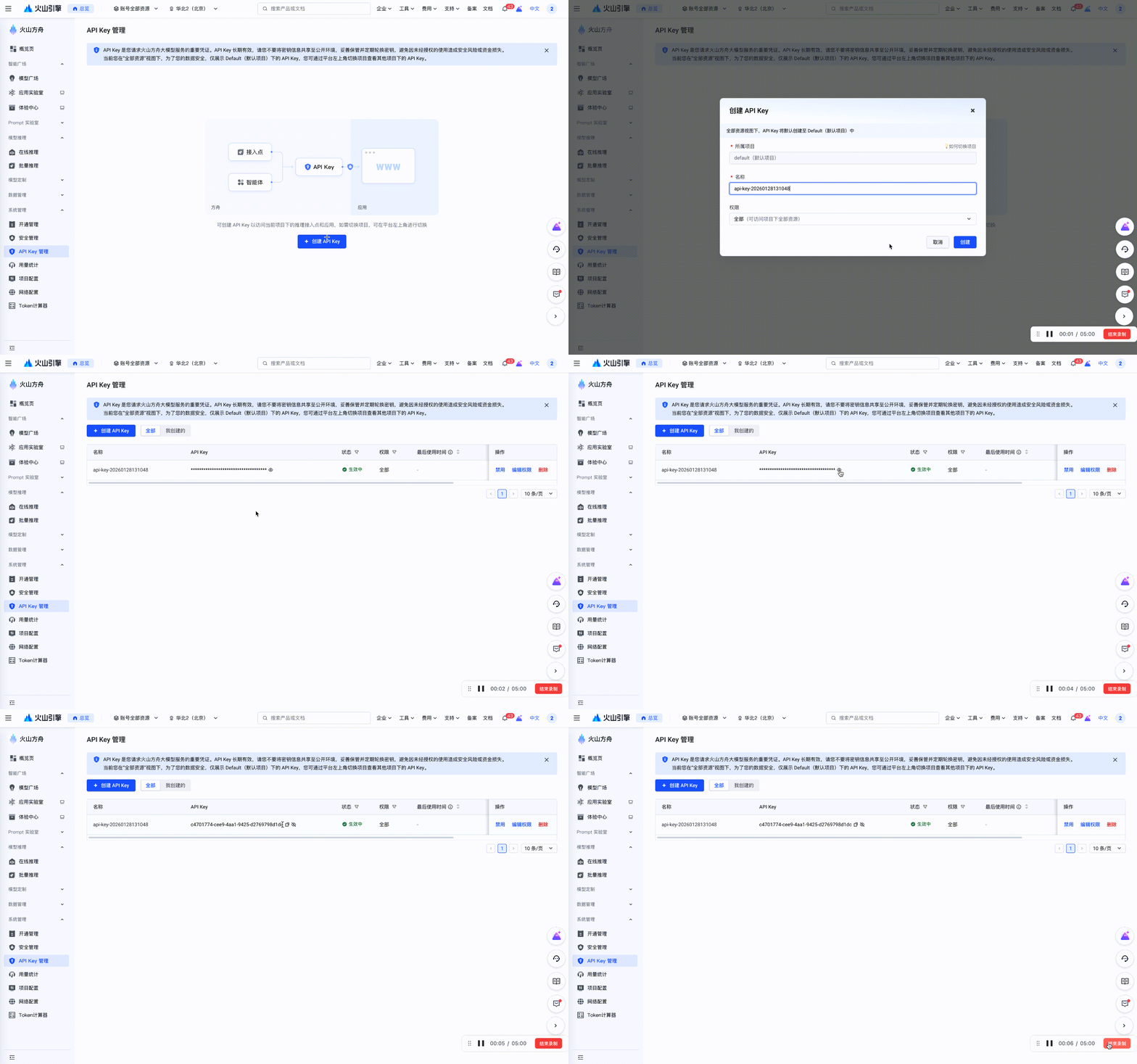
3. Create API Key
Visit: API Key Management Page
All model calls require an API Key.
- Select "API Key Management" (API Key 管理) in the left navigation bar of Volcano Ark.
- Click "Create API Key" (创建 API Key).
- Copy and save the API Key for subsequent configuration.
4. Activate VLM Model
Visit: Model Management Page
- Select "Provisioning Management" (开通管理) in the left navigation bar.
- Select the "Language Model" (语言模型) column.
- Find the Doubao-Seed-2.0 model.
- Click the "Activate" (开通) button.
- Confirm the payment method.
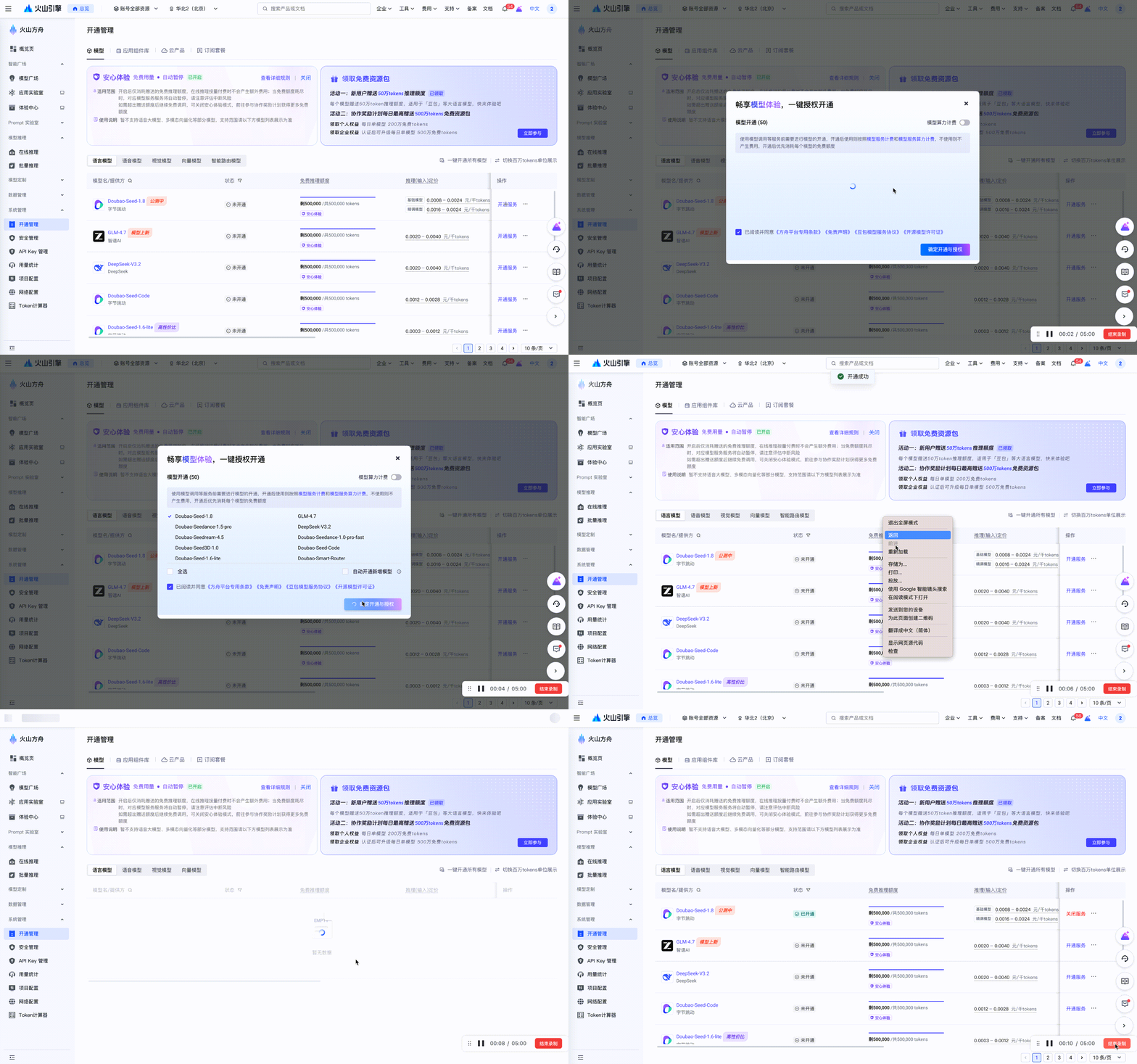
After activation, you can use the model ID directly: doubao-seed-2-0-lite-260428
5. Activate Embedding Model
Visit: Model Management Page
- Select "Provisioning Management" (开通管理) in the left navigation bar.
- Select the "Vector Model" (向量模型) column.
- Find the Doubao-Embedding-Vision model.
- Click "Activate" (开通).
- Confirm the payment method.
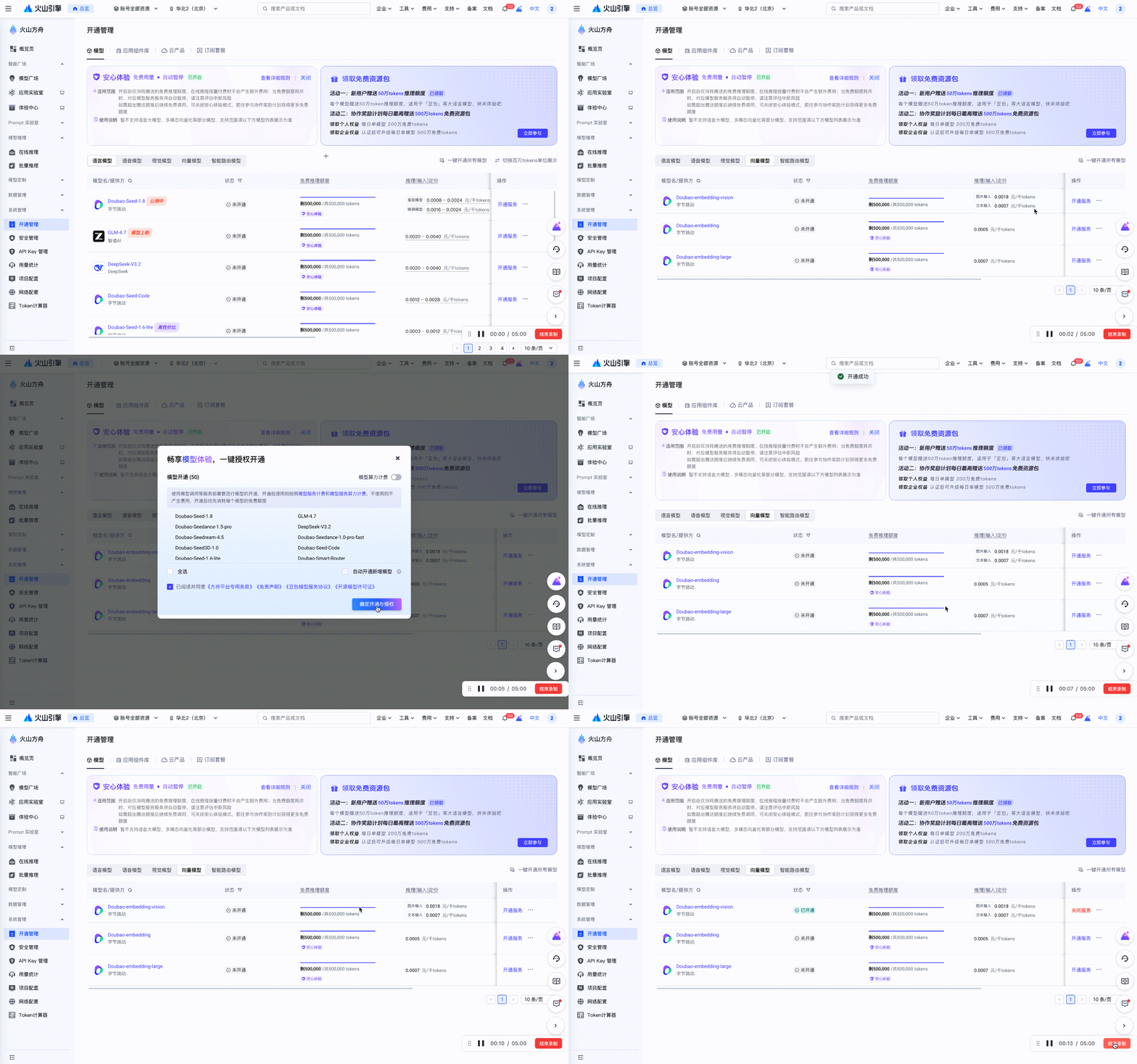
After activation, use the model ID: doubao-embedding-vision-251215
Configure OpenViking
Configuration Template
This template shows the configuration structure; replace all string placeholders before use. For an existing configuration, update only the model sections and preserve storage, authentication, and other settings:
{
  "vlm": {
    "provider": "<provider-type>",
    "api_key": "<your-api-key>",
    "model": "<model-id>",
    "api_base": "<api-endpoint>",
    "temperature": 0.1,
    "max_retries": 3
  },
  "embedding": {
    "dense": {
      "provider": "<provider-type>",
      "api_key": "<your-api-key>",
      "model": "<model-id>",
      "api_base": "<api-endpoint>",
      "dimension": 1024,
      "input": "<input-type>"
    }
  }
}
Configuration Fields Explanation
VLM Configuration Fields
| Field | Type | Required | Description |
|---|---|---|---|
provider | string | Yes | Model service provider, fill in "volcengine" for Volcengine |
api_key | string | Yes | Volcano Ark API Key |
model | string | Yes | Model ID, e.g., doubao-seed-2-0-lite-260428 |
api_base | string | No | API endpoint address, defaults to Beijing region endpoint, see Appendix - Regional Endpoints for details |
temperature | float | No | Generation temperature; supported values depend on the model. This example uses 0.1 |
max_retries | int | No | Number of retries when request fails, recommended 3 |
Embedding Configuration Fields
| Field | Type | Required | Description |
|---|---|---|---|
provider | string | Yes | Model service provider, fill in "volcengine" for Volcengine |
api_key | string | Yes | Volcano Ark API Key |
model | string | Yes | Model ID, e.g., doubao-embedding-vision-251215 |
api_base | string | No | API endpoint address, defaults to Beijing region endpoint, see Appendix - Regional Endpoints for details |
dimension | int | Yes | Must match the model output and index; this example selects 1024 |
input | string | No | Input type: "multimodal" (multimodal) or "text" (plain text), default "multimodal" |
Configuration Example
Add these model sections to ~/.openviking/ov.conf, preserving existing unrelated settings:
{
  "vlm": {
    "provider": "volcengine",
    "api_key": "your-ark-api-key",
    "model": "doubao-seed-2-0-lite-260428",
    "api_base": "https://ark.cn-beijing.volces.com/api/v3",
    "temperature": 0.1,
    "max_retries": 3
  },
  "embedding": {
    "dense": {
      "provider": "volcengine",
      "api_key": "your-ark-api-key",
      "model": "doubao-embedding-vision-251215",
      "api_base": "https://ark.cn-beijing.volces.com/api/v3",
      "dimension": 1024,
      "input": "multimodal"
    }
  }
}
Replace both your-ark-api-key values with the key from Step 3. This model credential is separate from the user/admin key used to connect to OpenViking Server.
Verify Configuration
Test Connection
Check model configuration, then start the server:
openviking-server doctor
openviking-server
In another terminal, configure the CLI and create quickstart.md using the Quick Start. Import it into an unused target:
ov add-resource ./quickstart.md --to viking://resources/model-check --wait
ov find "Who owns the backup process?" --uri viking://resources/model-check
An accepted import does not establish that model configuration works. Wait for completion before searching; after a timeout, inspect the returned task ID, and after failure, read the task error.
View Usage
In the Volcano Ark Console:
- Visit the "Overview" (概览) page.
- View Token Consumption Statistics.
- Check billing details in "Billing Center" (费用中心).
Billing Information
Billing Methods
| Model Type | Billing Unit |
|---|---|
| VLM | Check the selected model’s input/output billing rules in Ark pricing |
| Embedding | Check the selected model and input modality in Ark pricing |
Free Tier
Check your console and Volcano Ark pricing for credit availability, eligible models, expiration, and charges after credits run out. Measure token usage with a small document before estimating bulk-ingestion cost; credits do not guarantee coverage of every trial workload.
Troubleshooting
Common Errors
Invalid API Key
Error: Invalid API KeySolution:
- Check that the API key was copied completely without extra whitespace.
- Confirm that the API Key has not been deleted or expired.
- Re-create an API Key.
Model Not Activated
Error: Model not activatedSolution:
- Check the model status in the Volcano Ark Console.
- Confirm that the selected model ID is available to the account.
- Check if the account balance is sufficient.
Network Connection Issues
Error: Connection timeoutSolution:
- Check your network connection.
- Confirm that the
api_baseconfiguration is correct. - If you are overseas, confirm that you can access Volcengine services.
- If the service is reachable but slow, adjust the relevant timeout using the Configuration Guide.
Getting Help
Related Documentation
- Configuration Guide - Complete configuration reference
- Quick Start - Start using OpenViking
Appendix
Regional Endpoints
| Region | API Base |
|---|---|
| Beijing | https://ark.cn-beijing.volces.com/api/v3 |
This guide uses the Beijing endpoint from official examples. For another region, copy the model endpoint from the console rather than substituting a region name in the hostname.
Model Version Reference
| Purpose | Model ID used in this guide |
|---|---|
| VLM | doubao-seed-2-0-lite-260428 |
| Embedding | doubao-embedding-vision-251215 |
These are example versions, not a claim about the latest release. See Ark model releases for availability and vectorization documentation for input and dimension settings. Before changing embedding models, check whether the existing index needs rebuilding.